Latest Updates

Google Glass takes you on an epic and emotional first-person trip home for Mother's Day

Google Glass takes you on an epic and emotional first-person trip home for Mother's Day

Google has posted a new video, shot entirely with Google Glass, just in time for Mother's Day. The film was created by students at the University of Southern California's School of Cinematic Arts, and is part of the Glass Creative Collection. Titled "Seeds," the video features a man taking a long journey home to India to surprise his mother.

Check it out, and let us know what you thought in the comments.

Source: YouTube


Via: Google Glass takes you on an epic and emotional first-person trip home for Mother's Day

Half-Life 2 coming to NVIDIA Shield

Half-Life 2 coming to NVIDIA Shield

Half-Life NVIDIA Shield

We just got word that Portal's headed to NVIDIA Shield on May 12. And judging from this bright green crowbar that just arrived at our office (we're gonna owe the receptionist a little something extra this month to explain that one), Half-Life 2 is headed to the portable gaming console as well.

No word on when it'll drop, or what it'll cost.

Because, ya know, crowbar.

Crowbar


Via: Half-Life 2 coming to NVIDIA Shield

How to use Private Mode on the Samsung Galaxy S5

How to use Private Mode on the Samsung Galaxy S5

Private Mode on the Samsung Galaxy S5 is a convenient way to hide files you don't want seen by others, without the need for any third-party apps. When you're in Private Mode, all your photos, videos, and other files will be viewable. Exit Private Mode and hand your phone to somebody else. You can rest assured they can't see any of your hidden files, unless they know your code or unlock pattern.

Here's how to set up Private Mode on the Galaxy S5 and get started with it:

How to enable Private Mode on the Samsung Galaxy S5

  1. Swipe down from the top of any screen on your Samsung Galaxy S5 using two fingers.
  2. Now tap on Private Mode from the list of icons.
  3. The first time you enter Private Mode, you'll be given a short walkthrough as well as be asked to enter a pin code. This only happens the first time you enable Private Mode.
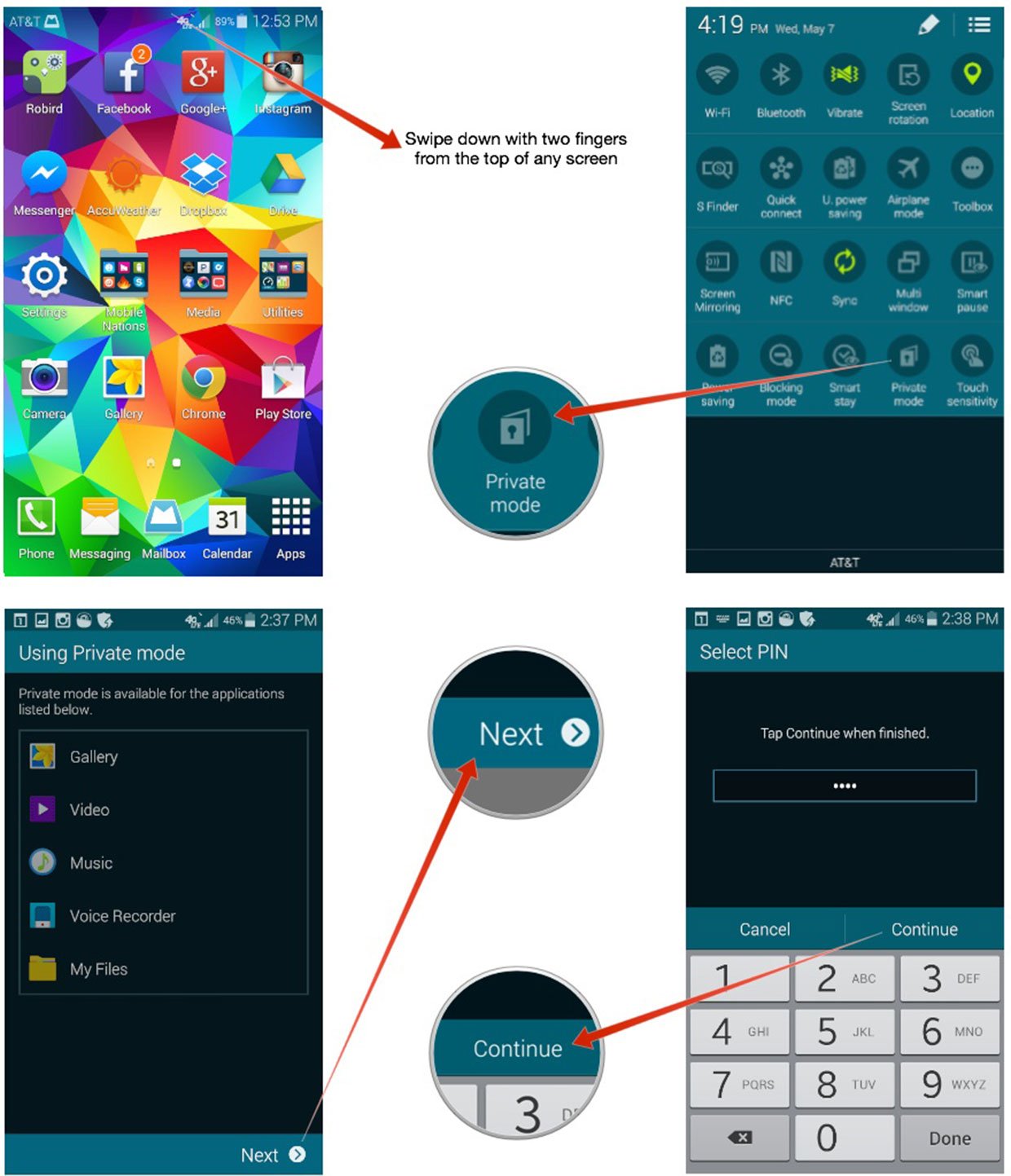
Keep in mind you'll need the pin you set up for Private Mode each time you enter it. Be sure you pick something you can easily remember.

How to disable Private Mode on the Samsung Galaxy S5

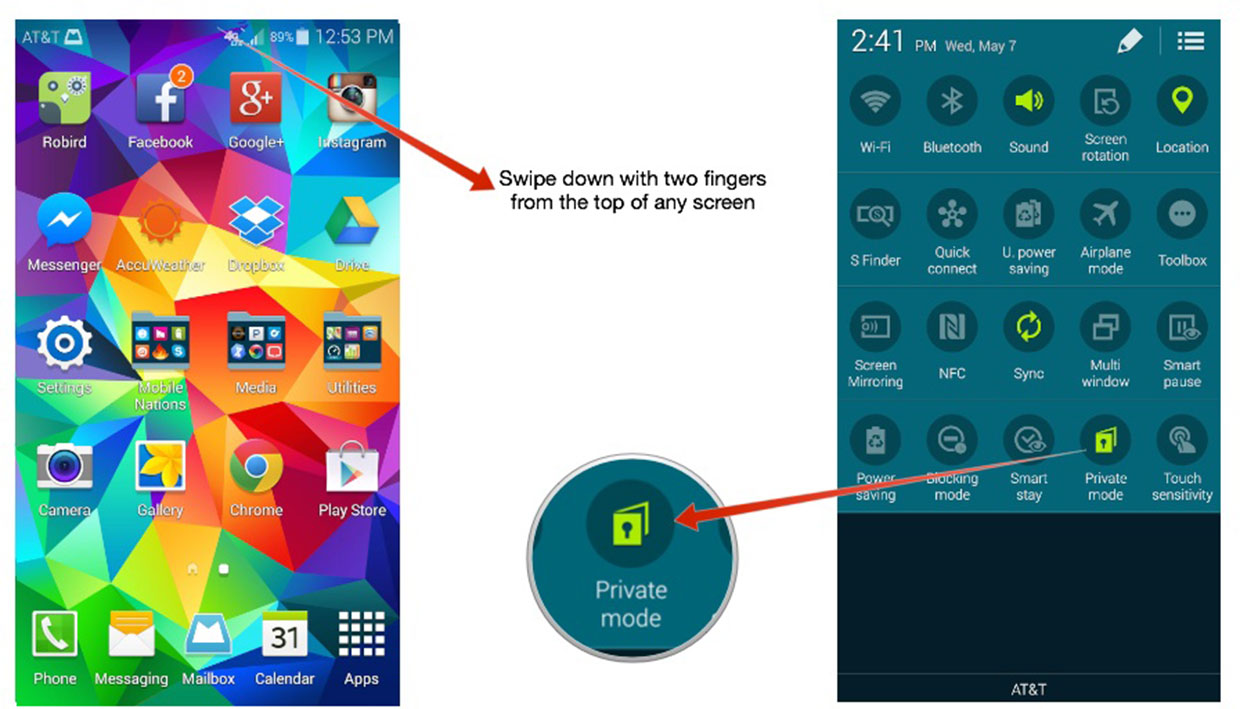
  1. Swipe down from the top of any screen on your Samsung Galaxy S5 using two fingers.
  2. Now tap on Private Mode again.
  3. Your Galaxy S5 should now be in normal mode again. Be sure to do this before handing your device over to anyone you don't want accessing things labeled for Private Mode Only.
How to add and remove files from Private Mode on the Galaxy S5

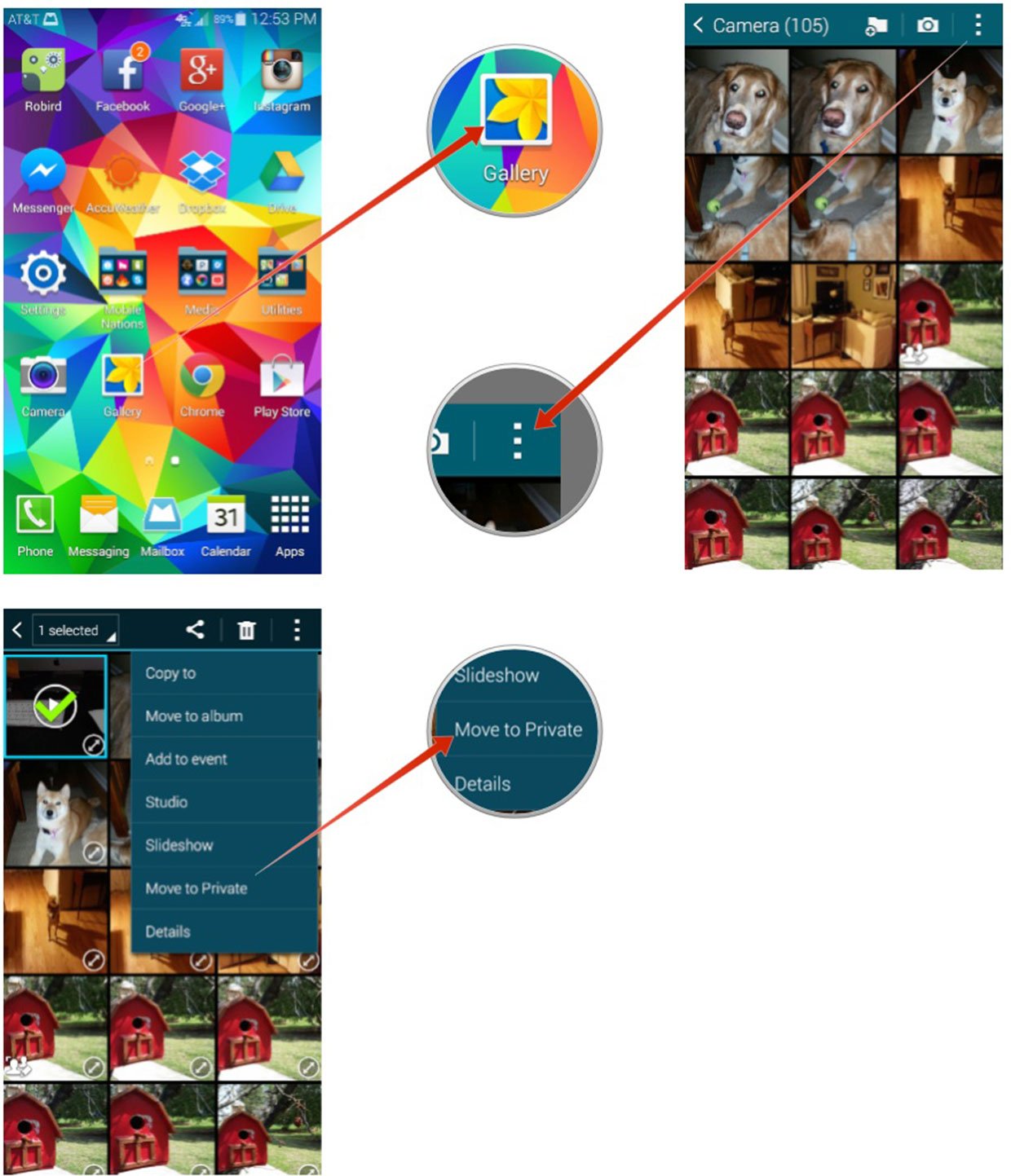
Private Mode supports several different media types including photos and videos. Follow these steps to add supported files to Private Mode:

  1. Turn Private Mode On.
  2. Now navigate to the photo or file in question that you only want viewable while in Private Mode.
  3. Select it or multiple files and then tap on the Overflow menu button in the upper right.
  4. Tap on Move to Private.

That's it. Your Galaxy S5 will add those files to a private album or folder that is only viewable when in Private Mode.

I've noticed that Private Mode is a little glitchy for me and doesn't offer the option on all my photos, only some of them. I also have to select them and can't tap into them and see the Private Mode option. Anyone else seeing the same issues? Let me know in the comments!


Via: How to use Private Mode on the Samsung Galaxy S5

LG G3 images leaks again, this time in gold

LG G3 images leaks again, this time in gold

LG G3 images leaks again, this time in gold

Previously we've seen various close-ups or blurry shots of LG's upcoming G3, but today some new images have surfaced that give us a much better look at the new device. Now we can see the G3 in full and in gold and get we get a much better overall view of both the front and back that we've haven't seen before. Keep in mind that even though the G3 looks shiny and metallic here, it may very well still be plastic casing just like the LG G Flex.

These photos don't leave much else to the imagination showing off the full back camera and flash. On the other side of the lens is what we had assumed to be an IR blaster window as on the G Flex, but GSMArena is saying that it's a laser (presumably infrared) to help with focusing at night we'll believe it when we see it. It could be both, really. The front shows a slim bezel surrounding the 5.5" display, along with the speaker and LG branding. When all is said and done, we've seen the G3 in gold, white and grey.

In any case, we should find out plenty more at the end of the month.

Source: GSMArena


Via: LG G3 images leaks again, this time in gold

Subway Surfers takes on the tunnels of Vancouver

Subway Surfers takes on the tunnels of Vancouver

Subway Surfers Vancouver

Kiloo has published an update for its popular Subway Surfers game on iOS, Android and Windows Phone. In this latest release, players are able to traverse through Vancouver, Canada. Not only is there a new adventure awaiting, but a new character is also available Olivia the spirited girl scout. Olivia comes bearing gifts in the form of new outfits and boards, just in case the current collection wasn't enough.

If you're not familiar with the game, Subway Surfers takes players down the subways of major cities around the world and is a highly addictive endless runner. As well as the new location, character and bonus items for personalization, players can also add a humorous new Moose board to their collection and locate hidden maple leaves in the new subway to win special prizes.

Subway Surfers is a free download from Google Play and is available now.


Via: Subway Surfers takes on the tunnels of Vancouver

Ingress adds Capsules for better collaboration, doubles levels to 16

Ingress adds Capsules for better collaboration, doubles levels to 16

Ultra Strike weapons make the leap from Droid devices to all players

Niantic Labs the developer behind Google's "Ingress" game today announced a trio of significant updates to the game.

Probably the biggest is that the max of level a player can reach has been doubled from Level 8 to Level 16. Those at the upper levels will be able to recharge Portals from farther away, and they'll get extra XM storage, too.

The addition of Capsules will make it far easier for agents to share items with each other. (Finally!)

And Ultra Strike Weapons a rare kind of XMP Burster are no longer exclusive to Motorola Droid devices and can now be obtained by anyone.


Via: Ingress adds Capsules for better collaboration, doubles levels to 16

A couple of older HTC phones updated with Heartbleed fix

A couple of older HTC phones updated with Heartbleed fix

HTC One S Heartbleed fix

A quick heads up for those of you sporting the HTC One S on T-Mobile, or EVO 4G LTE on Sprint. Be on the lookout for a system update that'll patch the OpenSSL "Heartbleed" bug. It's a small update and takes just a minute or two to install. But it's one you don't want to skip.

More: HTC One S forums, EVO 4G LTE forums


Via: A couple of older HTC phones updated with Heartbleed fix